Class-wise structures, fines, concessions, online payments, instant receipts — and automated reminders that do the awkward follow-up so your office doesn't have to.
Set up your fee structure once — class-wise heads, transport slabs, sibling discounts, fines and concessions — and every receipt, ledger and reminder flows from it.
Printed or WhatsApp/SMS — numbered, GST-ready, impossible to misplace.
Parents pay from the app with UPI, cards or netbanking; reconciliation is automatic.
Polite, persistent reminders by app notification and SMS — your staff never make the awkward call again.
Daily collection, head-wise, class-wise, defaulter ageing — one click each.
Numbers from a typical 800-student school's fee desk — before and after.
| Task | Before eSchoolApp | After eSchoolApp |
|---|---|---|
| Collecting one fee at the counter | 4–5 min with manual receipt | Under 1 min, receipt auto-printed |
| Sending fee reminders | Staff phone calls for 2–3 days | Automatic app + SMS, zero staff time |
| Daily reconciliation | Evening tally, frequent mismatches | One-click day-close report |
| Defaulter list for the principal | Compiled monthly, already stale | Live, one tap, always current |
| Online payment entry | Manual entry from bank statement | Auto-reconciled to the student ledger |
How the desk actually runs once eSchoolApp takes over the repetitive work.
The details fee clerks mention when other schools ask about eSchoolApp.
Any receipt, any year, reprinted in seconds — with the original number.
Reverse a bounced cheque and the dues, fine and ledger correct themselves.
Transport, tuition, activity — every rupee lands in its own head, automatically.
New session dues generated for the whole school in one click.
Tap any line to expand. This is the complete feature list for this module — everything ships in the standard ₹50/student price.
Fees Heads: Define and manage fee heads and group them as per school fee structure. eSchool also supports optional fee heads.
Course Setup: Define classes and group them by fee slabs.
Installments: Define installment dates for when the fees are due.
Concessions: Give discounts to students on a percentage or in terms of amount. Use templates for standard deals like RTE, BPL, staff-child, sibling, etc.
Payments: Accept partial payments or complete payments. Inbuilt checks to prevent overcharging and optional locks to enforce fees for the previous session.
Modes : Supports multiple modes of payment: School, Bank, Cheque, Cash. The mechanism to an auto-cancel fee if cheque bounces.
Receipt: Customized Fee receipt in multiple formats. Next due date and amount mentioned on the ticket. Receipt cancellation with comments.
Explanation: Head month-wise bifurcation of the amount displayed on the screen. A complete history of payments received in the given session.
Refund: Calculate and provide refunds for students leaving school in between sessions.
Serial Print: Export all receipts in a given serial number range.
Delay Application: Accepts a delay payment application from parents and optionally generates a defaulter list without delay applications until the date mentioned in the application
Auto Receipts The fee is already configured; collect the fee receipts would be automatically generated, you can print or send it to the customers as pdf.
Challan and Concession Supported Configure the Challan receipts for your entrance exams or apply for a live concession. It’s all possible with eschoolApp
Online Payments The completely online first utility that promotes parents to skip the long lines and make payments online.
Consolidated report about your collection from defaulters to your expectations and actual income. Everything on your fingertips.
ADMIN APP STUDENT’S APP REPORT FORMATS ERP FEATURES Notifications Fees Management Scholar Attendance Manage Document Scholar Register Manage Transport Results Management Library Management Multiple Users Online Payment Scholar ID Card Master Setup Scholar Vacancy Staff Register Online Examination Stock Management Payroll Management School TimeTable Online Class Activity log Lesson Plan Multiple Branches Vouchers School Kit Sale Ticketing System Fee Collection Software Fee Collection Software
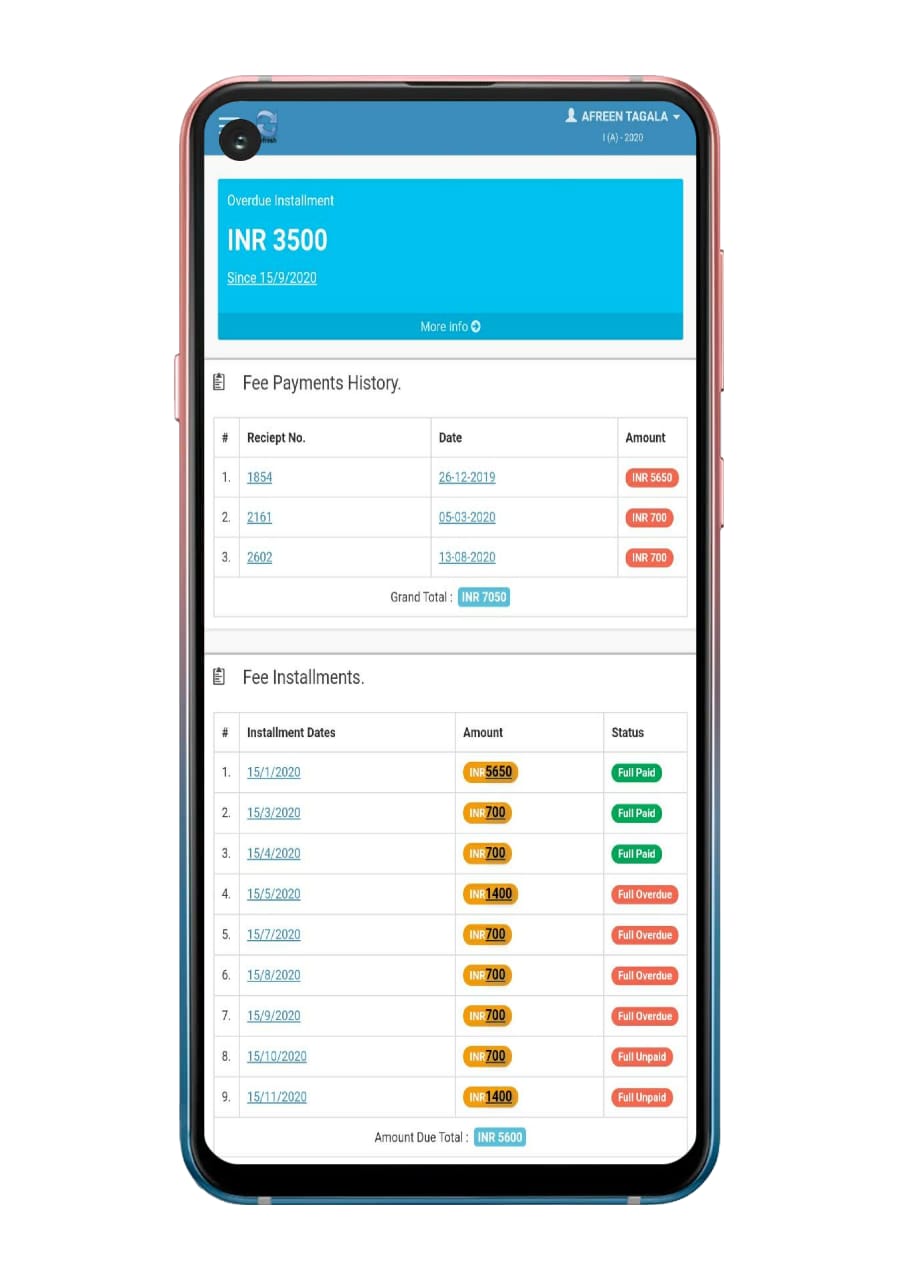
Previous Next FEES In short, parents can make fee payments via mobile. Similarly, track fees schedule, the fee paid, upcoming installments, and moreover pending installments for all the fees to be paid.
Most importantly, the parents can view all the installments fees payable throughout the year. After that, the system sends the notification to all the defaulters.
In this way, all fee payments made by the parent are shown in the Payment History section with details of fee heads, date of payment, mode of payment, and receipt Number. Meanwhile, Parents can also make fee payments using debit/credit card or net banking. So, the functionality works with the underlying ERP and all payments received either via bank, cash, cheque, online are reported directly in the daybook and fee scholar register.
In short, this helps the parents keep track of every dime paid to the school directly on the cash counter or sent via the children. In this way, it facilitates the schools in speeding up and monitoring the fee collection process. As a result, fee defaulter and fee submission notification can reach parents successfully.
As system notifications are being sent to the parent for upcoming and missed fee schedules.
Certainly, parents can also make fee payments using debit/credit card or net banking.
Similarly, a parent views all the fees to be paid throughout the year upfront and as fee Instalments.
So all fee payments made by the parent are shown in the Payment History section with details of fee heads, date of payment, mode of payment, and receipt Number.
Meanwhile, this helps the parents keep track of every time paid to the school directly on the cash counter or sent via the children.
Above all payments received either via bank, cash, cheque, online are reported directly in the daybook and fee scholar register.
To sum it facilitates the schools in speeding up and monitoring the fee collection process.
In addition, notifications are sent for fee defaults and successful fee submissions.
Parties Name: This section allows the school to input the parties’ names through which daily debit and credit transactions are taking place. It ultimately helps the school to figure out the expenses and income individually.
Create Vouchers: This section allows the voucher entry of every incoming and outgoing transaction. Schools can make the selection based on the above configuration. Schools can select the Voucher Head, Party Name, Payment Mode, and Amount type (Credit or Debit). Afterward, voucher receipt can be generated in pdf.
Account Reports: For every school managing the inventory becomes a very cumbersome task. Managing all the reports in one place is quite a thing. Nevertheless, eSchoolApp reports are easy to export and find everything in one place. This exclusive report is a combination of three reports. It includes the Stock Sales Report (Income), Fees Daybook Collection (Income), and Staff Salary Dispatch (Expense). Various filters are also available for generating reports based on Voucher number, Voucher Heads, Payment Type, and many more.
Income and Expenses: Based on the date selection, the school can get the Income and Expenditure report in a single click. The export functionality is available in all reports.
• Simple and fast entry process.• Schools are moving from desktop software to mobile app where financial data is accessed on the cloud.
When you maintain your accounts manually, the chances of making errors are multifold. Even a routine task such as invoicing, if gone wrong, can lead to multiple repercussions in your accounting data, which become tough to rectify. However, eSchoolApp provides a simple method of using and maintaining the vouchers in the most effective way.
REPORT FORMATS ADMIN APP Vouchers Vouchers
🖼️ View sample screens on the ERP → 📱 See it in the live demo app →
Modules the current page works hand-in-hand with.
💳 Fee payment →📔 School diary →🖼️ Gallery →🗓️ School calendar →🎓 Results & report cards →📚 Library →📋 Attendance →🎦 Online classes →📝 Online exams →💬 Chat →🏖️ Apply leave →📜 Activity log →🏫 Multiple branches →🛍️ School kit sale →🎫 Ticketing →📣 Notices & information →✏️ Marks entry →🔐 User permissions →📸 Student photos →💰 Fee collection →💼 Salary timesheet →🧾 Vouchers →🚌 Bus tracking →
We connect Indian payment gateways supporting UPI, cards and netbanking; settlement goes to the school's own account. Ask us on WhatsApp for current gateway options and charges.
Yes — part payments, instalments and adjustments are supported, and the balance reflects everywhere instantly.
Record them in the same screen; receipts print instantly and the ledger stays unified across cash, cheque and online.
A 30-minute walkthrough, on WhatsApp video or screen share. No forms, no spam — just the product.
 eSchoolApp