App, RFID gate or biometric device — attendance lands in one register, parents get alerted instantly, and the monthly reports write themselves.
However attendance is captured, it lands in the same register and the same parent alert goes out.
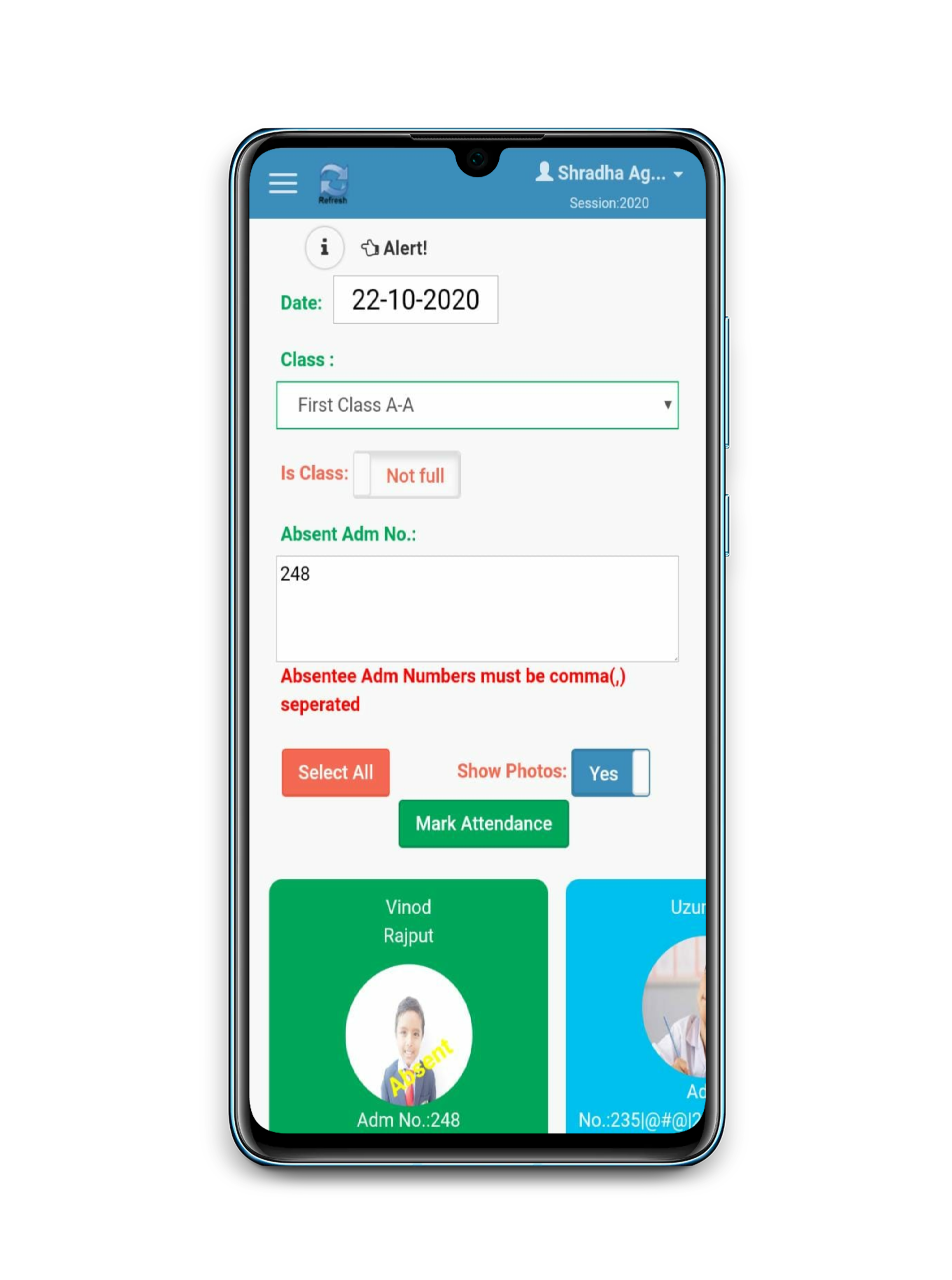
Mark a class in under 30 seconds; leaves and half-days handled.
Students tap in at the gate; parents get the timestamp.
Fingerprint or face devices for students and staff — see our hardware page.
Absent alerts go out before the first period ends.
What changes for teachers, the office and parents from day one.
| Task | Before eSchoolApp | After eSchoolApp |
|---|---|---|
| Marking a class of 40 | 5–7 min roll call + register | Under 30 seconds in the teacher app |
| Informing absent students' parents | Office calls, often missed | Automatic alert before first period ends |
| Monthly register totals | Manual counting, errors common | Auto-computed, board-format ready |
| Staff attendance for payroll | Separate muster, re-typed | Biometric punches flow into payroll |
| Leave records | Paper applications, lost slips | Applied and approved in the app |
Four capture methods — pick per campus, mix freely; every one lands in the same register.
Tap-tap-done. A full class marked before the chalk reaches the board.
Students tap in at the gate; the timestamp goes straight to parents.
Fingerprint or face — best for staff payroll and senior classes.
Camera-based, hygienic and fast for junior classes.
Tap any line to expand. This is the complete feature list for this module — everything ships in the standard ₹50/student price.
ATTENDANCE Goodbye bunking! Now, with the eSchool App, the parents can keep a track of the attendance percentage of their ward. As a result, parents get instant notifications if a child is absent from school.
Using the eSchoolApp, the parents get instant information about their ward’s information on a daily basis.
As shown in the figure on the left, a calendar type grid is used to inform the parents about the monthly and session percentage of the child’s attendance in the school in the given year of the term.
The information about the holiday (H), absence (A), or leave (L) is clearly shown on the calendar along with the attendance percentage for the current month and the session.
Parents also receive system notifications when their child is marked absent on any given day, gives them that peace of mind that the child has reached school.
At the school’s end, eSchool generates reports for compliance containing information such as No. of students in school, No of Girls, No of boys, No of SC students, No of ST students with their attendance.
eSchool also helps in generating appreciation cards for students and analysis of attendance information.
Attendance can help the school class teachers to keep the student’s attendance updated on Parent App. Instantly parents get the push notification.
Manage attendance of student’s on a daily basis within a minute. Teachers can take Attendance by roll number or scholar number and it instantly reaches on the parent app.
Teachers can take attendance by class and roll number. Attendance can be additionally marked by scholar photo, scholar Roll no., scholar Name, and scholar ADM No.
The full class present can be marked in just one click. SMS of attendance will be sent on the Parent app Teachers are not allowed to backdate attendance
Daily mails of attendance will be sent on registered mail id. This ensures that the marked attendance is always at your fingertips
Student Leaves As shown in the figure on the left, a calendar type grid is used to inform the parents about the monthly and session percentage of the child’s attendance in the school in the given year of the term.
No Backdating Teachers are not allowed to mark backdated attendance. This acts as a security feature to ensure that no proxies of any kind are entertained.
You can actually mark the attendance by days as well in case you could not mark the attendance or started using the app in the middle of the session.
Special Days: Define day as a special day, which is a working day when all students will be marked present (Ex: Sports Day, parent’s meeting, etc).
Leave: Manage scholar leaves with reason.
Daily Attendance: Mark Attendance by roll number or scholar number. Instantly inform parents via App and SMS. Enter attendance via Excel.
Monthly Report: Attendance grid for every class section with days as columns and students as rows. Session and month percentage with details of gender and caste at the bottom. Exportable to excel and pdf.
Filtering Report: Filter attendance based on attendance percentage, RTE, or continuous absence. Generate appreciation cards.
Daily Summary: Single page report to show daily absent, leave, and percentages class section-wise and overall for each day.
Every class teacher will only mark attendance for the assigned class and it’s so easy that you just need to mark absent students.
Application of leaves and its approval is made very simpler and easier via using mobile apps only a few authorized people can approve it.
Mass Attendance You can mark the attendance in bulk to ensure that the student’s records are on track.
Biometric attendance and automatic notification Using Biometric devices, you are sure to have your students and parents amazed as when they tap in the parents will receive a notification instantly.
ADMIN APP STUDENT’S APP REPORT FORMATS Attendance Attendance
🖼️ View sample screens on the ERP → 📱 See it in the live demo app →
Modules the current page works hand-in-hand with.
💳 Fee payment →📔 School diary →🖼️ Gallery →🗓️ School calendar →🎓 Results & report cards →📚 Library →📋 Attendance →🎦 Online classes →📝 Online exams →💬 Chat →🏖️ Apply leave →📣 Notices & information →✏️ Marks entry →🔐 User permissions →📸 Student photos →💰 Fee collection →💼 Salary timesheet →🧾 Vouchers →🚌 Bus tracking →📜 Activity log →🏫 Multiple branches →🛍️ School kit sale →🎫 Ticketing →
Within moments of marking — absent alerts typically reach parents before the first period ends.
Yes. Staff biometric punches flow into the HR & payroll module, so salary timesheets need no re-entry.
Biometric devices buffer punches and sync when connectivity returns; the teacher app works on mobile data.
A 30-minute walkthrough, on WhatsApp video or screen share. No forms, no spam — just the product.
 eSchoolApp